I was fiddling around with a Flipper Zero and a LilyGo T-Embed, researching different vulnerabilities and digging through firmware documentation. That reminded me of the BSides Tallinn 2025 badge.
The badge had a slightly unusual feature: it connected to Wi-Fi, fetched its owner’s name from a server, saved it locally and displayed it on the screen.
I also remembered that the source code was public. I had previously used the badge firmware as a base for a custom game, so naturally my first instinct was to find the GitHub repository and start digging.
It took about 2 minutes to discover the vulnerability and to realize: the entire system was built on trust, love and the assumption that nobody brings a Wi-Fi dev board to a Cybersecurity conference, because why should they?
Connecting to the Event Network
The badge connects to the event Wi-Fi using the following function:
async def _connect_wifi(self):
    if not self.wlan:
        self.wlan = network.WLAN(network.STA_IF)

    self.wlan.active(True)

    if not self.wlan.isconnected():
        self.wlan.connect(SSID, PASSWORD)

        for _ in range(20):  # wait up to ~10 seconds
            await asyncio.sleep(0.5)

            if self.wlan.isconnected():
                return

        raise RuntimeError("Could not connect to WiFi")
The SSID and password are stored in the public firmware source. The problem is that the badge appears to trust any access point presenting the expected SSID and password.
There is no mechanism for distinguishing the legitimate event network from a cloned access point. Attacker can simply create another Wi-Fi access point with the same credentials and wait for badges to connect to it with it’s custom configured DHCP/DNS
Fetching the badge name
After connecting, the badge requests the owner’s name with the device id from the BSides server:
URL = "https://badge.bsides.ee"

async def _fetch_name(self):
    proto, rest = URL.split("://", 1)

    if "/" in rest:
        host, base_path = rest.split("/", 1)
        base_path = "/" + base_path
    else:
        host, base_path = rest, ""

    port = 443 if proto == "https" else 80

    addr_info = socket.getaddrinfo(host, port)
    addr = addr_info[0][-1]

    s = socket.socket()
    s.connect(addr)

    if proto == "https":
        s = ssl.wrap_socket(s, server_hostname=host)

    path = base_path + "/getname/" + device_id
    req = "GET {} HTTP/1.0\r\nHost: {}\r\n\r\n".format(path, host)
    s.send(req.encode())

    resp = b""

    while True:
        data = s.recv(512)

        if not data:
            break

        resp += data

    s.close()

    body = resp.split(b"\r\n\r\n", 1)[-1]

    try:
        data = json.loads(body)
    except ValueError:
        raise RuntimeError("Invalid JSON")


    if "error" in data:
        raise RuntimeError("{}".format(data.get("error", "")))

    if data.get("id", "").upper() != device_id.upper() or "name" not in data:
        raise RuntimeError("Unexpected response")

return data["name"].strip()- At first glance, this looks reasonably sensible:
- The badge uses HTTPS.
- It connects to badge.bsides.ee.
- It sends the hostname to ssl.wrap_socket().
- It checks that the returned device ID matches the requested ID.
- It requires the JSON response to contain a name.
Unfortunately, HTTPS is only useful when the client verifies that it is talking to the correct server. In this implementation, the client appears to create an encrypted TLS connection without requiring the server certificate to be signed by a trusted certificate authority. Allowing anybody to self sign the cert.
The Request Flow
The normal request flow is straightforward:
Badge joins the "bsides-badge" Wi-Fi network
                    ↓
Badge requests the address of badge.bsides.ee through DNS
                    ↓
Badge connects to the returned address on TCP port 443
                    ↓
Badge requests /getname/<device-id>
                    ↓
Badge saves and displays the name from the JSON response
The important part is DNS. Devices normally get info about what DNS server to use through DHCP when they join a network. A cloned network can set their own DNS server. The DNS could resolve bsides.badge.ee to our controlled ip. The badge requests:
/getname/<device-id>The attacker returns something like:
{
  "id": "A1B2C3D4",
  "name": "HAHA GET REKTTTT"
}
The ID matches, the `name` property exists, and the badge accepts the response.
Building the Proof of Concept
Once I understood the request flow, I took out my LilyGo T-Embed and cloned the Bruce firmware repository.
The T-Embed is a small ESP32-based device with a display, Wi-Fi support, NFC, Sub-GHZ, Bluetooth, a battery and enough portability to disappear into a pocket. In other words, it is an ideal platform for conducting serious embedded security research.

It is also an ideal platform for changing everyone’s conference badge name to
get rektI wanted to create a custom Bruce application that reproduced what a nearby attacker could do.
- The PoC application should perform five tasks: It starts a WPA2 access point named bsides-badge using the expected password.
- It should configure 192.168.4.1 as the gateway and DNS server.
- It should respond to DNS queries with 192.168.4.1, including queries for badge.bsides.ee.
- It should start an HTTPS server on TCP port 443 using a self-signed certificate.
- It should handle requests to /getname/<device-id> and return a controlled name in the expected JSON format.
At this point I faced the most difficult part of the entire project: reading enough of the Bruce documentation to build a custom application correctly.
Like the vibe coder I am, I made the responsible engineering decision to spin up my GPT-5.6 to help generate the initial app structure. I was trying to validate the vulnerability not begin a three day journey through an unfamiliar embedded firmware codebase. After an hour of trying to compile I succeeded and on the first try the PoC worked like it should.
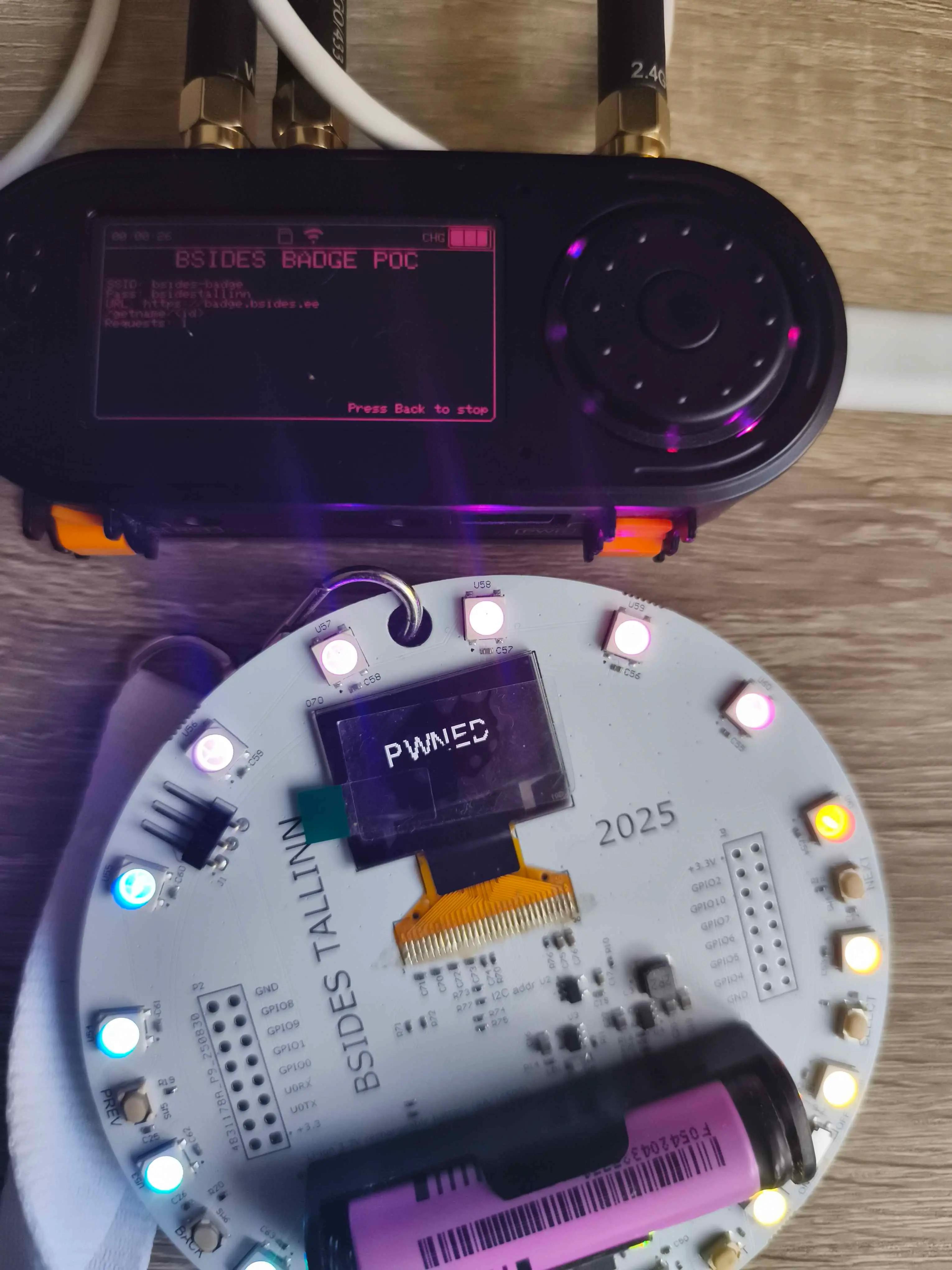
Impact
Potential results include:
- Harmless jokes
- Offensive or embarrassing text
- Misleading instructions
- Social-engineering message because the text switches between BSides logo and the name what could be harmful